
MTG Proxies on SpellTable: Camera Readability, Glare, and Practical Fixes
TLDR
- If your MTG proxies on SpellTable look like shiny rectangles, fix lighting first, not your printer.
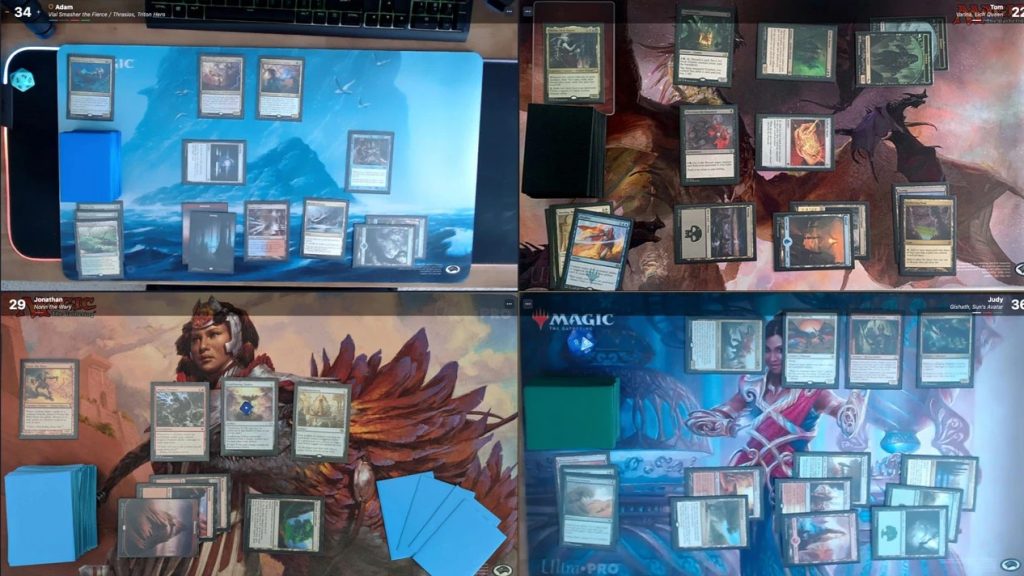
- SpellTable’s card recognition likes a straight-down camera, a dark playmat, and minimal sleeve glare.
- Matte sleeves help. Overhead point-source lighting usually does not.
- If recognition fails, you can still play. Just make your proxies readable and have Oracle text ready.
- Proxies are a Rule 0 thing. Sanctioned events are a “real cards only” thing.
This post helps webcam Commander players use MTG proxies on SpellTable without turning every game into “Zoom Court: The Case of the Unreadable Card,” so the table can actually play Magic.
You can absolutely play MTG proxies on SpellTable and have a clean, readable board state. You just need to beat the true final boss: glare. Glare never taps out, never misses a trigger, and always shows up when you finally kept a hand you like.
First, a quick reality check about proxies and SpellTable
SpellTable is a webcam table. It’s not a tournament. That means proxies are usually fine when your pod is fine with them, and when you are not trying to get weird about it.
Two quick rules that keep your blood pressure healthy:
- Casual webcam games: Ask the table, be clear, keep proxies readable.
- Sanctioned events: Authentic cards required, with narrow judge-issued exceptions for damage during an event. Your home printer does not count as a judge.
If you want fewer awkward moments, treat proxy use like you treat Rule 0. Mention it early, keep it short, and let people opt in or out like adults.
Why SpellTable readability breaks (and why it’s usually not “your camera sucks”)
https://spelltable.wizards.com
SpellTable’s big quality-of-life feature is card recognition: you click a card in the video feed and it tries to identify it and pull up the card for everyone. That’s amazing when it works, and mildly comedic when it decides your Sol Ring is actually a swamp with ambition.
In practice, card recognition fails for three boring reasons that all feel personal anyway:
1) Glare blocks the details SpellTable needs
SpellTable itself basically says it: glare is not your friend. If the sleeve reflection wipes out the name line, the system can’t “read” the card because it can’t see it.
2) Camera angle warps the card
SpellTable wants a camera looking straight down. Even a small tilt can skew the card shape and make text harder to resolve. Bonus pain: an angled camera makes glare worse because you are creating the perfect mirror bounce into the lens.
3) The card face is unreadable at webcam scale
This is where proxies get unfairly blamed. A clean proxy with crisp text is often easier to read than a real card under bad lighting. But a meme alt-art with tiny rules text, low contrast, or heavy foil shine will punish everyone equally.
MTG proxies on SpellTable: the Readability Triangle
Here’s the framework that saves time: Readability = Lighting + Camera + Surface.
If one corner is bad, the whole thing collapses. And yes, that means your $200 webcam can still look awful under a single ceiling bulb like it’s interrogating your playmat.
Fix order (do this before buying stuff)
- Lighting
- Camera position
- Background contrast
- Sleeves and card finish
- Proxy layout choices
If you start with “buy a new webcam,” you will spend money and still lose to glare. Glare always wins on value.
Practical fixes that work in real life
Lighting: stop aiming a spotlight at your sleeves
The goal is simple: bright, even light with no hot reflections.
Good
- Use diffused light, not a bare bulb pointed straight down at your board.
- Move lights off-axis so reflections bounce away from the camera.
- If you only have one lamp, aim it at a wall or ceiling to bounce light back softly.
Better
- Use two light sources on opposite sides so you reduce harsh shadows and keep brightness even.
- Keep lights a bit higher than the table and angled so they are not reflecting straight up into the lens.
Best
- Use a setup that behaves like “fill light,” not “interrogation light.” Some people do this with ring lights positioned to spread light evenly without creating a bright reflection patch on sleeves.
Also, remember that lighting and camera height interact. A lower camera often makes reflections more obvious because the reflected hotspot takes up more of the card’s visible area.
Camera position: straight down, stable, and framed like you meant it
Wizards’ own setup guidance is blunt: camera straight down, adjust light if there’s glare, and use a solid dark playmat for contrast. That’s the holy trinity.
What “straight down” actually means
- Your play area looks like a rectangle, not a trapezoid.
- Card text isn’t “leaning” away from the lens.
- You can point at a card without your opponent seeing a funhouse mirror version of it.
Mounting tips that matter more than specs
- A camera arm (or any stable overhead mount) is the easiest way to keep the angle consistent.
- A built-in laptop webcam is usually a bad time because it can’t aim down properly.
- Phone-as-camera can work great if it’s stable and aimed properly.
Focus and exposure: tame the auto settings
If your camera is constantly hunting focus, your cards will “pulse” between readable and blurry.
- If your webcam software allows it, try locking focus once the playmat is sharp.
- If auto exposure keeps brightening and darkening every time you move your hand, lock exposure if you can.
You are not filming a nature documentary. Your board state should not be “breathing.”
Background contrast: make the game easier for humans and machines
A dark, non-reflective playmat helps the camera separate card edges and improves overall clarity. It also makes your proxies easier to parse at a glance, which is the actual point of playing a game with other people.
If your play surface is glossy, bright, or patterned like a kaleidoscope, you are basically playing on hard mode for no prize support.
Sleeves and finishes: matte is your friend, shiny is… shiny
Glossy sleeves reflect light like they’re proud of it. SpellTable’s own FAQ guidance (as surfaced in snippets) warns against glossy sleeves because glare causes issues.
Practical advice:
- If you are getting glare, try matte sleeves or sleeves known for reduced reflection.
- Avoid extra shiny outer sleeves if your lighting is already marginal.
- Foils look awesome in person and frequently look like a silver bruise on camera. If you insist on foils, your lighting has to be better than average.
Proxy-specific readability tips that do not involve pretending they are real
This is not about “fooling” anyone. It’s about making the game playable over webcam.
If you want MTG proxies on SpellTable to feel smooth:
- Make the card name line high contrast and easy to read.
- Keep rules text legible. Tiny text and low contrast becomes mush on webcam.
- Avoid super dark art that swallows the text box in poor lighting.
- Prefer non-foil finishes for webcam play when possible.
- Keep proxies consistent across the deck. Mixed styles slow the game down because everyone has to re-learn what your cards look like.
And if you are playing with strangers, “clearly marked” proxies avoid a lot of unnecessary drama. Drama is plentiful already. No need to manufacture it.
A fast troubleshooting table
When something looks wrong, diagnose it like an adult and not like a goblin hoarding webcams.
| Symptom | Likely cause | Quick fix |
|---|---|---|
| Cards look washed out | Too much direct light, exposure too high | Move light off-axis, diffuse it, lower exposure if possible |
| Bright white streak across sleeves | Glare reflection | Change light angle, raise camera, switch to matte sleeves |
| Cards are readable but SpellTable won’t identify them | Angle distortion, glare, or low detail | Aim camera straight down, improve lighting, use dark playmat |
| Focus keeps shifting | Autofocus hunting | Lock focus or use manual focus if available |
| Whole board is blurry | Camera too far, low resolution, dirty lens | Clean lens, reframe tighter, try 1080p camera or phone |
The social fix that prevents 80 percent of proxy complaints
Sometimes the technical setup is fine and the real issue is expectations.
Say one sentence before the game:
- “I’m running some proxies for testing, they’re readable, everyone cool with that?”
If someone says no, the correct move is switching decks or pods. It is not a debate club moment. Nobody has ever been argued into having fun.
FAQs
Are MTG proxies allowed on SpellTable?
SpellTable is a platform, not a rules committee. In practice, proxies are a Rule 0 decision for your pod or lobby. Ask up front and be clear.
Why won’t SpellTable recognize my proxy cards?
Most of the time it’s glare, camera angle, or low detail on the card face. A crisp proxy under good lighting can recognize fine. A real card under a ceiling spotlight can fail.
What’s the best lighting to reduce glare?
Broad, diffused light and angles that do not bounce reflections into the lens. Avoid a single overhead point source aimed right at your sleeves.
Do I need a fancy webcam?
Not necessarily. A stable, straight-down angle and good lighting matter more than price. That said, 1080p tends to be a sweet spot for clarity.
Are foils bad on SpellTable?
They are not “bad,” but they are objectively better at producing glare than they are at being readable on a webcam. If you want to keep foils, improve lighting and sleeve choice.
Related ProxyKing reads
Share this Post
Recent Posts
- How Popular Is Lorcana in 2026? A Reality Check
- Buying MTG Proxies Safely: Red Flags and Payment Safety Basics
- MTG Commander Card Draw: How Many Sources Is “Enough”?
- MTG Proxies on SpellTable: Camera Readability, Glare, and Practical Fixes
- MTG Commander Ramp Mistakes: When “More Ramp” Makes Your Deck Worse
Product Categories
ProxyMtG@protonmail.com